


Go Browser - Fast & Safe
4.889.00 Reviews
App Specs
- Version
- 1.1.1
- Updated On
- License
- Free
- Downloads
- 100,000+
- Developer
- DBK Entertainment
- Categories
- Tools
- Platform
- Android
Screenshots

 Analysis by AppCompare
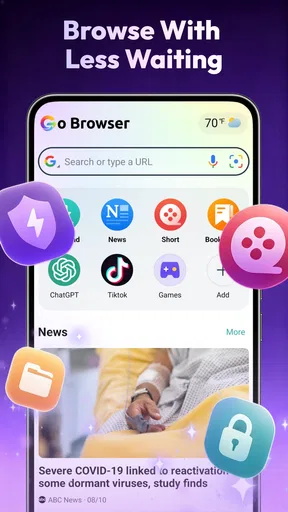
I judge a browser less by how many buttons it can display than by whether it makes everyday browsing feel comfortable and predictable. Go Browser is a free Android tools app from DBK Entertainment, aimed at people who want a straightforward place to read news, check the weather, and browse privately. That combination gives it a practical purpose, but it also raises a useful question: do you want one light, focused browser, or a more established option with a broader set of familiar features?
My recommendation depends on what you expect “private” to mean. A browser can be a convenient choice for keeping casual searches separate from your usual browsing, but that alone should not be treated as a guarantee of anonymity or protection from every kind of tracking. If you mainly want a simple alternative for quick searches and reading, this app is worth considering. If you need detailed privacy controls, polished syncing across devices, or tools you already rely on elsewhere, compare it carefully before making it your default.
What to consider before choosing it
I start by asking what I want a browser to simplify, because a second browser is only useful if it gives everyday tasks a clearer place to live. For Go Browser, the decision hinges on whether quick searches, casual reading, and checking news or weather belong together in your routine. I’d also separate that convenience from any assumptions about privacy, then consider how much you rely on the setup you already have.
Decide what “private browsing” needs to do for you
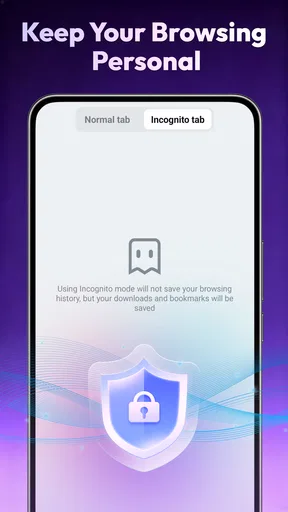
Start with the situations you want to handle. If you occasionally look up a personal topic on a shared phone, or prefer not to mix one-off searches with your regular browsing routine, a dedicated browser can make that separation easier. Go Browser’s privacy-oriented positioning makes that use case a natural fit. I would still avoid assuming that the word “private” means every trace disappears or that websites cannot identify you; those are different promises, and the app’s brief description is not enough to establish them.
For sensitive activity, I would first check the privacy controls available in the app itself and decide whether they meet your needs. Also consider the account, network, and website involved: a private browsing environment does not automatically hide activity from every party. That distinction matters more than a reassuring label, especially if you are choosing a browser for a specific security concern rather than ordinary convenience.
Think about the jobs you want one browser to handle
The app’s appeal is the pairing of browsing with news and weather. That can suit someone who likes to open one place, scan headlines, check conditions, and then search for details without moving between several apps. It is a modest, useful idea rather than a reason to expect a full news service or a specialized forecast tool. If you already have preferred apps for those jobs, the bundled approach may matter less.
Before switching, ask whether you need a browser mainly for quick, occasional visits or as the center of your digital routine. People who depend on saved logins, bookmarks, open-tab continuity, or cross-device synchronization should check how their current setup can be carried over. A browser can feel fast to adopt for a single search and still be inconvenient as a replacement if the little habits built around another browser are missing.
Worth Reading Before You Choose

Baby Panda World Brings Quick Play to Modern Phones, but Its Game Library Feels Busy

ESPN’s Live Game View Makes Following Close Games Easier

QuizzLand Review: A Good Fit for Short Trivia Breaks, Not Every Player

Basketball Stars: Multiplayer Is Fast, but Can It Recover When Matches Go Wrong?

WEBTOON Turns Phone Updates Into a Better Reading Routine

Link to Windows Runs on Shared Habits, Not Social Feeds
Who is most likely to enjoy it
I can see Go Browser working well for someone who wants a simple secondary browser: one for quick searches, casual reading, and keeping a separate browsing routine. It may also suit a person who appreciates having news and weather alongside browsing rather than opening separate apps for every small check. The store’s Teen content rating gives families a useful age label to consider, though it is not a substitute for deciding what browsing access is appropriate for a particular young user.
It is less compelling for someone who wants a highly configurable browser or a carefully documented privacy setup. If your daily work depends on extensions, detailed tab management, synced passwords, or a particular ecosystem, do not assume those needs are covered just because this is a browser. I would test the exact tasks you rely on before moving your routine across.
Where Go Browser makes sense in daily use
In daily use, I’d look for small moments where opening one app instead of several makes a real difference: checking conditions before heading out, scanning a headline, then searching for a detail. A useful test is to give Go Browser a defined role for a few days rather than immediately making it the default. That shows whether its mix suits your habits without disrupting saved links, accounts, or routines elsewhere.
A quick stop for searches, headlines, and weather
Imagine checking the forecast before leaving home, glancing at a headline during breakfast, and opening a search result to read more. Go Browser’s combination of browsing, news, and weather is relevant to that small, repeated routine. Its value is not that it replaces every specialist app; it is that it may reduce the number of places you open when the task is light and time-sensitive.
A practical way to evaluate it is to use it for a few ordinary days without changing your main browser. Try the same types of tasks you normally do: look up a local service, read an article, and check the weather before an appointment. Notice whether moving between those activities feels direct or whether you keep reaching for your usual apps. That simple trial tells you more than installing it and judging from its first screen.
Use a separate browser intentionally
One non-obvious benefit of a second browser is not a hidden technical feature; it is the boundary it creates in your habits. You might reserve Go Browser for quick, non-work searches or for reading topics you do not want mixed into your regular set of tabs. Keeping that boundary clear can make it easier to know which browser to open and to avoid accumulating unrelated pages in your primary one.
There is a trade-off: separation only helps if you remember which browser holds what. If you open a page in one app and later expect to find it in another, the split can create friction. I would choose a simple rule, such as using this app for casual browsing and the existing browser for saved work or shopping accounts. That kind of deliberate division is more useful than installing a second browser and letting both become equally cluttered.
News and weather are convenient, but not automatically comprehensive
Having headlines and weather close to browsing is handy for a quick overview. For decisions that need detail, though, I would open a dedicated source: a trusted news outlet for full reporting, or a weather service when timing and local conditions matter. Treat the built-in combination as a convenient starting point, not as a substitute for checking a source you rely on.
This is where the app’s focus can be either an advantage or a limitation. If your goal is to reduce small interruptions, keeping these checks together may help. If you want extensive customization of news topics or forecasts, a separate specialist app may suit you better. The right choice depends on whether convenience or depth matters more in your routine.
What its popularity can and cannot tell you
Go Browser has an average rating of 4.8 from around 7.9 thousand ratings, with 88 written reviews, and it has passed 100 thousand installs. Those figures suggest that many people have tried it and that ratings are strongly positive. They are useful context, but they do not show whether the browser fits your particular phone habits or whether its privacy approach matches your expectations.
It is free, which makes a low-commitment trial easier, but “free” should not be confused with “perfectly suited.” I would install it only if the browsing and daily-check use cases sound useful, then see how it handles your own routine. The current version is 1.1.1, a detail worth keeping in mind when comparing your experience over time, since software can change as it is updated.
Where another browser may be the better choice
A different browser may be a better fit if your priority is continuity across devices, advanced customization, or controls you can evaluate against a specific privacy need. Dedicated news and weather apps can also make more sense when you want depth rather than a quick overview. I’d compare those options by the task that matters most to me, not by assuming that one general-purpose browser should cover every need.
Choose a familiar default when continuity matters most
If your existing browser already holds the bookmarks, passwords, and tabs you depend on, staying with it may be the easier decision. Mainstream browsers often become valuable through accumulated habits and device connections, not just the act of loading a page. I would not abandon that convenience for a second browser unless Go Browser solves a specific problem—such as giving casual searches a separate home or putting quick news and weather checks in one place.
For someone who uses a browser across several devices, continuity is especially important. Before switching, check whether the things you need can be moved or whether you will have to rebuild them manually. If that process is awkward, a secondary-browser role may be a better fit than a complete replacement. You can judge the app’s everyday feel without disrupting a setup that already works.
Pick a specialist when the task demands depth
There are times when a browser is the wrong tool for the job. If you need detailed weather information, use a dedicated weather app you trust. If you follow particular publications, their apps or websites may offer a more focused reading experience. And if your priority is advanced privacy, compare browsers on specific controls and clear explanations rather than relying on a broad privacy description.
That is not a criticism unique to Go Browser. Combining several everyday purposes can save steps, but it can also leave specialist needs unmet. I would choose it for convenience and a separate browsing lane, not on the assumption that it replaces a dedicated security tool, news reader, or forecast service.
Account for the small costs of switching
Changing a default browser takes more than installing an app. You may need to learn where your usual controls are, decide which browser should open links, and work out what to do with existing bookmarks or saved sign-ins. Even when the new app is easy to use, those small adjustments add up. A gradual trial is the safer approach: use Go Browser for a limited set of low-stakes tasks first, and keep your current browser available while you decide.
There is also a practical question about your Android device. The listed minimum operating system is Android 8.0, so check that your phone meets that requirement before planning a switch. If it does, installation is only the beginning; the more important test is whether the app fits your habits without making common tasks harder.
My recommendation after weighing the trade-offs
My recommendation is to try Go Browser as a limited, low-stakes addition first, then keep it only if its browsing-and-information mix genuinely saves effort. I’d avoid moving important accounts or relying on it for a privacy promise until I’ve checked the controls and tested the tasks I care about. That approach lets the app earn a place in your routine without turning a simple trial into a disruptive switch.
A sensible secondary browser for the right routine
I would recommend Go Browser to someone who wants a free, uncomplicated option for casual browsing and appreciates having news and weather close at hand. Its strongest case is as a practical second browser: it can give quick searches their own space while leaving a familiar browser in charge of important accounts, work, and saved information. That setup limits the cost of switching while letting you find out whether the app’s approach suits you.
I would be more cautious about making it your only browser straight away. If privacy is the main reason you are considering it, inspect the controls and decide whether they address your actual concern. If your priority is a robust collection of advanced features or seamless continuity with another device, compare those needs directly rather than inferring them from a browser’s general description.
Try it with a clear test, then decide
Give it a short, specific trial: use it for a morning weather check, one or two headline reads, and a few ordinary searches. Pay attention to whether the combination saves steps, whether you can find your way around comfortably, and whether you miss features from your regular browser. Those observations will make the decision personal and concrete instead of based only on a score or a promise.
Overall, I see Go Browser as a focused convenience choice, not an automatic upgrade for every Android user. DBK Entertainment has positioned it around private browsing alongside everyday information, and that mix will appeal most to people who want a light secondary option. If that describes you, it is worth trying; if you need specialized privacy, deep customization, or a browser tightly woven into an existing device setup, your current browser or a more specialized alternative may be the better fit.
Pros
- Lightweight design helps it run smoothly on many Android devices.
- Tabbed browsing makes it easy to switch between pages.
- Built-in ad blocking can reduce clutter on supported websites.
- Private browsing lets you browse without saving local history.
- Simple interface is easy for first-time users to navigate.
Cons
- Ad blocking may not work on every site or block every ad.
- As with many free browsers
- some features may include ads.
- Limited customization compared with established browser alternatives.
- Private mode does not hide your activity from websites or your network.
- Browser quality and updates may vary by device and app version.
FAQs for Go Browser - Fast & Safe
What is Go Browser - Fast & Safe?
Go Browser - Fast & Safe is a mobile web browser designed for people who want to open websites quickly and browse with a straightforward interface. Its features and appearance may vary by app version and device, so check the current store listing for details before installing. As with any browser, the sites you visit and the information you enter can affect your privacy and security.
Is Go Browser - Fast & Safe safe to use?
The app’s name alone cannot guarantee that every browsing session is safe. For safer use, download it from the official Google Play Store or Apple App Store, review its developer and requested permissions, and keep the app and operating system updated. Be cautious with unfamiliar links, downloads, and websites asking for passwords or payment details, and consult the app’s privacy information to understand how data may be handled.
Is Go Browser - Fast & Safe free, and does it include ads?
Pricing, advertising, and any optional purchases can change over time and may differ between Android and iOS versions or regions. Check the app-store listing and the in-app screens before downloading to see whether the browser is free, displays ads, or offers paid features. Also review subscription terms carefully if any are presented, including the price, renewal schedule, and cancellation instructions.
What permissions or personal information might Go Browser - Fast & Safe need?
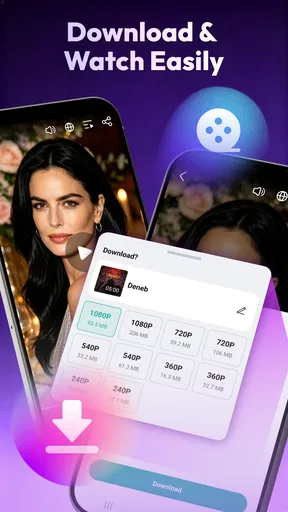
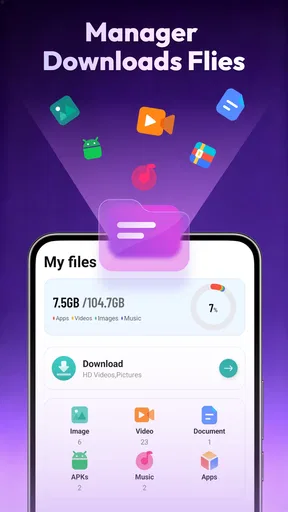
A browser may request access to information or device features needed for functions such as downloading files, choosing a location for downloads, or using a website’s camera or microphone. Requests depend on the features you use and your device settings; they should not be approved automatically. Review the permissions requested by Go Browser - Fast & Safe and its privacy policy, and deny access that does not seem necessary for your intended use.
How do I install Go Browser - Fast & Safe, and what should I check first?
Find Go Browser - Fast & Safe in the official app store for your device, then confirm the app name, developer, compatibility, recent update information, and user reviews before installing. Requirements and availability can vary by country and operating-system version. After installation, explore the settings for privacy, search, and downloads, and avoid installing copies from unofficial websites, which may be outdated or altered.


